 DALY
DALY 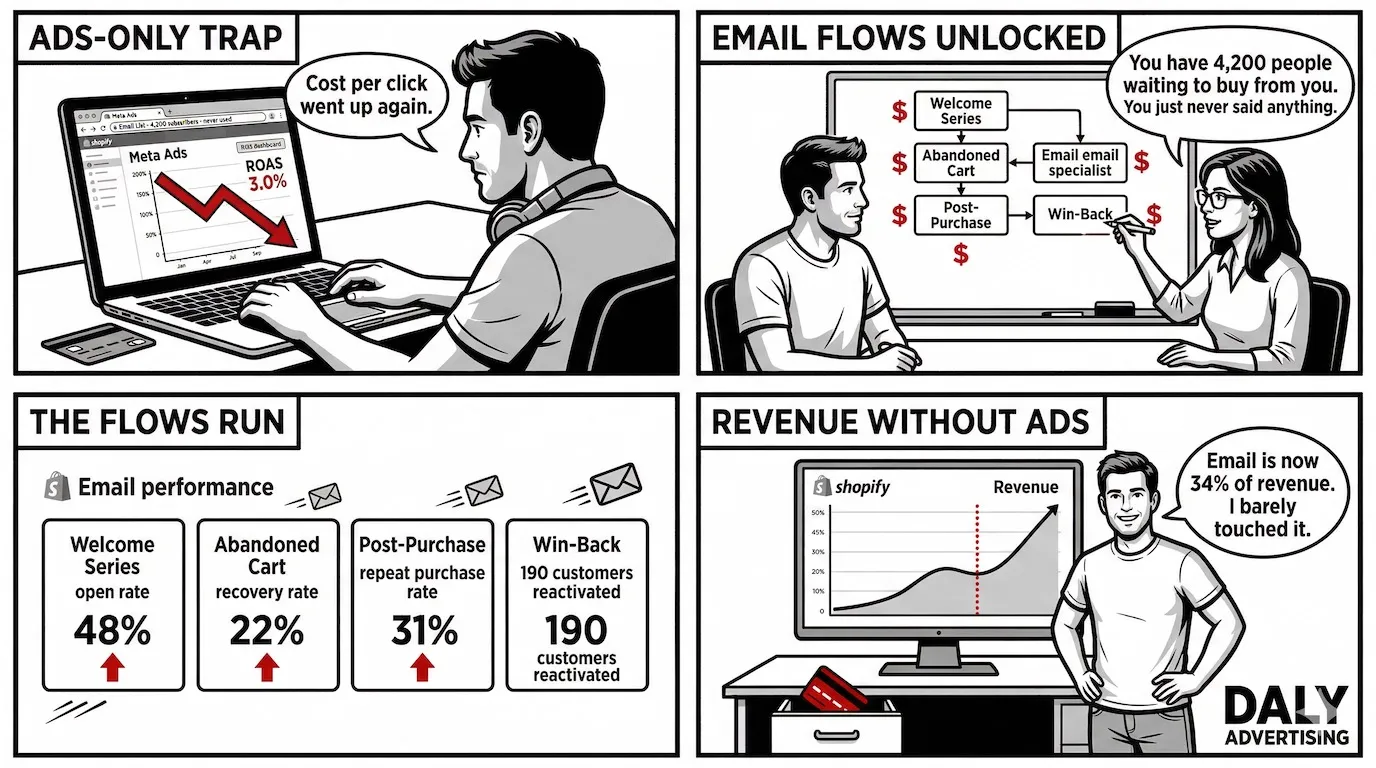
Most ecommerce stores are spending $5,000 to $20,000 a month on paid social to acquire customers they'll never see again. Meanwhile, email marketing - the channel that delivers $42 in revenue for every $1 spent (DMA/Litmus 2023) - sits mostly idle with a welcome email and a monthly promo blast nobody asked for.
That gap is the opportunity. The stores consistently hitting that 42x return aren't doing anything exotic. They're running six automation flows. They're segmenting by purchase behavior, not just by "subscribed" vs "unsubscribed". They're treating their list like a revenue asset instead of a broadcast channel. Stores using 3 or more automation flows earn 2x the revenue of those using none, according to Omnisend's automation benchmark - and most stores are running zero to one.
This guide covers the complete ecommerce email marketing strategy: the six flows you need before anything else, how to segment your list to drive 760% more revenue per campaign, platform comparisons, deliverability fixes, benchmark numbers by category, and how your email data feeds your Meta and Google ad audiences. If your email program isn't your best-performing channel yet, it will be after this.
Why Ecommerce Email Marketing Delivers a $42 Return on Every Dollar
Paid social averages a 2-4x ROAS for ecommerce. Email marketing averages 42x. That's not a rounding error - that's a different channel entirely, and most stores are treating it like an afterthought.
The $42 ROI figure comes from the DMA and Litmus 2023 benchmark report, and it holds across store sizes. What it doesn't tell you is why some stores hit that number while others grind out 5x and wonder where they went wrong. The gap almost always comes down to two things: automation and segmentation.
Stores running three or more automation flows earn 2x the email revenue of stores running none, according to Omnisend's automation benchmark. That math is brutal if you're still sending one monthly newsletter and calling it an email strategy. Meanwhile, segmented campaigns drive 760% more revenue than unsegmented blasts, per Campaign Monitor. Not 76%. Seven hundred and sixty percent.
| Channel | Average ROI / ROAS | Audience Ownership | Cost to Reach Existing Subscribers |
|---|---|---|---|
| Email marketing | 42x ROI | Owned | Near zero (ESP monthly fee) |
| Meta / paid social | 2-4x ROAS | Rented | Pay per impression, every time |
| Google Ads | 3-8x ROAS | Rented | Pay per click, every time |
| SEO / organic | Long-term, variable | Rented (algorithm-dependent) | Low ongoing, high upfront investment |
The owned vs. rented distinction matters more than most store owners realize. When Meta changes its algorithm or Google raises CPCs, your ad performance moves without your permission. Your email list doesn't. The 10,000 subscribers you earned last year are still yours tomorrow, regardless of what any platform decides to do with its feed.
What separates a 42x store from a 5x store isn't list size. It's list behavior. The stores hitting top-tier ROI run triggered automations that fire based on what shoppers actually do - browse a category, abandon a cart, make a first purchase. They segment by purchase history, not just demographics. And they treat every email as a direct-revenue event with a measurable outcome, not a brand awareness exercise.
If your email program is mostly broadcast campaigns sent to your full list, you're leaving the majority of that $42 potential on the table.
The 6 Ecommerce Email Flows Every Store Needs Running Before Anything Else
Before you run a single campaign, these six flows need to be live. Campaigns are optional. These aren't. Each one targets a specific moment in the customer lifecycle where purchase intent is highest - and ignoring any of them is a direct revenue leak.
1. Welcome Series
Your welcome series is the highest-ROI email sequence you'll ever set up. Omnisend data shows welcome emails generate 320% more revenue per email than standard promotional sends. The reason is simple: a new subscriber just raised their hand. They're more engaged at that moment than they'll ever be again.
A three-email welcome sequence works harder than a single welcome email. Email one fires within 10 minutes of signup - introduce the brand, set expectations, deliver any lead magnet you promised. Email two goes out 24 hours later with social proof: reviews, best-sellers, a specific number of happy customers. Email three, at 48-72 hours, is your first soft offer - a product recommendation or a time-limited incentive. Don't lead with a discount in email one. You're training your subscribers to wait for it.
2. Abandoned Cart Emails
Abandoned cart emails recover between 5% and 15% of lost revenue, per Klaviyo's benchmark data. A single email leaves that range's upper half on the table. A three-email sequence outperforms a single send by 69%, according to Omnisend. The timing structure that works: email one at 1 hour (no discount, just a reminder), email two at 24 hours (add urgency or social proof), email three at 72 hours (your recovery offer, if you're going to make one).
Don't open every abandoned cart sequence with a discount. You're training a segment of shoppers to abandon carts on purpose.
3. Browse Abandonment
Most stores skip this flow entirely, which is exactly why it performs. Browse abandonment fires when a subscriber views a product or category page without adding to cart. They haven't signaled purchase intent as strongly as a cart abandoner - but they've signaled interest. A single browse abandonment email sent within 1-2 hours converts at 3-5% on average, with no discount required because you're not recovering anything lost. You're accelerating a decision.
4. Post-Purchase Sequence
The sale isn't the finish line - it's the starting gate. Post-purchase sequences increase repeat purchase rate by up to 23%, per Klaviyo's 2023 ecommerce report. The sequence should do three things: confirm and delight (order confirmation + brand reinforcement), educate (product tips, how-to content that reduces buyer's remorse), and cross-sell (related products at the 7-14 day mark, after the original order has arrived). This is where one-time buyers become two-time buyers, and two-time buyers have a dramatically higher LTV than first-purchase customers.
5. Winback Campaign
Timing is everything in winback. Subscribers who haven't purchased or engaged in 90 days convert at 12% on a winback email. Wait until 180 days, and that rate drops to 4%. Your winback sequence should start at 60 days with a "we miss you" send, escalate at 90 days with your strongest offer, and at 120 days ask a direct question - still interested, or should you part ways? That last email reliably generates clicks because it creates a real decision point. The ones who don't click get suppressed. Your deliverability improves. Everyone wins.
6. Product Recommendation Emails
Personalized recommendations based on purchase and browse history outperform generic "you might also like" blocks at every level. This is covered in depth later in this guide - but as a flow, post-purchase product recommendations sent 14 days after delivery consistently show AOV 35% higher than standard promotional emails. The difference between a recommendation that converts and one that doesn't is behavioral data. First name isn't personalization. Purchase history is.
These six flows represent the core architecture of any serious ecommerce marketing program. Get them live before you spend a single hour on campaign creative.
| Flow | Trigger | Emails in Sequence | Key Benchmark |
|---|---|---|---|
| Welcome series | New subscriber | 3 emails over 72 hours | 320% more revenue per email vs promotional |
| Abandoned cart | Cart abandoned | 3 emails over 72 hours | 5-15% revenue recovery rate |
| Browse abandonment | Product/category viewed, no cart | 1-2 emails within 24 hours | 3-5% conversion, no discount needed |
| Post-purchase | Order confirmed | 3-4 emails over 14 days | +23% repeat purchase rate |
| Winback | 60/90/120 days inactive | 3 emails over 60 days | 12% conversion at 90-day trigger |
| Product recommendation | Purchase + 14 days | 1-2 emails | 35% higher AOV vs broadcast |
Ecommerce Email Segmentation: How to Stop Sending the Same Email to Everyone
Sending the same email to your whole list is the single most expensive habit in ecommerce email marketing. Not because the ESP charges you more - but because it trains your best customers to tune out and burns your sender reputation with your worst ones. Campaign Monitor's data puts a number on it: segmented campaigns drive 760% more revenue than unsegmented blasts. That figure is not a typo.
RFM Segmentation
RFM stands for Recency, Frequency, and Monetary value. It's the most reliable segmentation model for ecommerce because it ranks customers by behavior, not demographics. Recency asks when they last bought. Frequency asks how often they buy. Monetary value asks how much they spend.
In practice, this looks like separating your list into tiers. Your top 20% by spend are your VIPs - they deserve exclusive access, early launches, and loyalty recognition. Your mid-tier active buyers get your standard campaigns. Your low-spend, low-frequency segment gets re-engagement content and entry-level offers. When you isolate the top 20% and build campaigns specifically for them, average order value in campaign response doubles compared to sending the same message to your full list.
Lifecycle Stage Segmentation
A subscriber who joined your list yesterday needs different messaging than someone who bought from you six times. Lifecycle segmentation breaks your list into at least three buckets: new subscribers who haven't yet purchased, active buyers within the last 90 days, and lapsed contacts who haven't engaged or purchased in 90+ days.
Each segment gets a different content strategy. New subscribers get education and social proof. Active buyers get replenishment reminders, new arrivals, and cross-sell recommendations. Lapsed contacts get winback sequences - not your regular campaigns, which just train them to ignore you faster.
Behavioral Segmentation
Behavioral segmentation uses what subscribers actually do inside your emails and on your site. Click behavior tells you which product categories interest a contact. Purchase history tells you which ones they act on. Category views tell you what they're considering. Combining these signals lets you send a skincare customer your skincare launches instead of your full catalog - and that specificity is exactly why brands using three or more segments see 23% lower unsubscribe rates than those using one.
VIP vs At-Risk Treatment
Your VIPs and your at-risk customers need opposite approaches. VIPs respond to exclusivity - early access, members-only offers, recognition that they're not regular customers. At-risk customers (high historical spend, no purchase in 60+ days) respond to urgency and re-engagement incentives. Treating both groups the same is a fast way to lose both.
The Revenue Math on Segmentation
Here's a concrete example. Assume a list of 20,000 subscribers and an average order value of $85. An unsegmented blast to the full list at a 2% conversion rate generates 400 orders, or $34,000 in revenue. Segment that same list into five behavioral groups and send relevant campaigns to each - VIPs, active buyers, category-interested non-buyers, lapsed, and new subscribers - and a 4-5% conversion rate across segments (still conservative) generates 800-1,000 orders, or $68,000-$85,000. Same list. Same list size. The only variable is segmentation.
One maintenance note: remove subscribers who haven't engaged in 90+ days from your active segments before suppressing them entirely. That hygiene step alone improves deliverability by 15-25%, which means more of your emails to your active segments actually reach the inbox. Better segmentation and better ecommerce conversion rate optimization compound each other - the email brings the subscriber back, but your site has to close the deal.
Email Automation for Ecommerce: Building Flows That Run While You Sleep
Automated emails generate $0.45 in revenue per recipient, according to Klaviyo's internal benchmarks. Broadcast emails generate $0.03. That's a 15x gap, and it's the difference between an email program that funds itself and one that requires constant manual effort to justify.
Platform Comparison: Klaviyo vs Omnisend vs Drip vs Mailchimp
Platform choice matters less than most people think - and more than platform salespeople will admit. For ecommerce, you need a platform with native Shopify or WooCommerce integration, behavioral triggers, and revenue attribution. Four platforms dominate this space.
| Platform | Starting Price (500 contacts) | Ecommerce Integration | Automation Depth | Best For |
|---|---|---|---|---|
| Klaviyo | $45/month | Native Shopify, deep data sync | Advanced - predictive analytics, RFM built-in | Stores over $10k/month in revenue |
| Omnisend | $16/month | Strong, includes SMS native | Solid - pre-built ecommerce workflows | Early-stage stores, email + SMS combined |
| Drip | $39/month | Good WooCommerce/Shopify sync | Strong visual workflow builder | DTC brands that value workflow UX |
| Mailchimp | $20/month | Basic, not revenue-attributed natively | Limited ecommerce-specific triggers | Stores under $5k/month or content-first brands |
The verdict: Klaviyo is the right call for most stores doing meaningful volume. Its predictive LTV, built-in RFM segmentation, and Shopify data depth are genuinely ahead of the competition. Omnisend wins on price-to-value for smaller stores, especially if you're running email and SMS together. Mailchimp is fine for newsletters. For automated ecommerce flows with revenue attribution, it's a tool built for a different job.
Trigger-Based vs Time-Based Automation
Trigger-based automation fires when a subscriber does something: views a product, abandons a cart, makes a purchase. Time-based sequences fire on a schedule: 24 hours after signup, 7 days after purchase, 90 days since last order. Most of your high-ROI flows are trigger-based because they catch intent at peak temperature. Time-based sequences work for nurture, re-engagement, and replenishment reminders where behavior is predictable but not event-driven.
A store doing under $500,000 per year needs five automations live to compete seriously: welcome series, abandoned cart (3 emails), browse abandonment (1-2 emails), post-purchase (3 emails), and a 90-day winback. That stack requires maybe 12-15 emails total. Set it up once, optimize quarterly. That's the automation foundation everything else gets built on.
AI-Generated Subject Lines and Dynamic Content
AI subject line tools like Phrasee show a consistent 5-10% open rate lift in A/B tests versus human-written controls. That's not transformational on its own - but across 50 campaigns per year, a 7% average lift compounds into a meaningful revenue difference. Most platforms now include native subject line suggestions. Use them as a starting point, not a final answer. Test them against your own voice.
Dynamic product blocks - where the email renders personalized product picks at open time based on the subscriber's browse and purchase history - outperform static curated picks by 29%, according to Nosto data. The practical implication for Shopify marketing is that your email platform needs to connect to your product catalog in real time, not just at send time. Klaviyo and Omnisend both support this natively.
The stores pulling $0.45 per recipient from automation aren't doing anything exotic. They've built the six core flows, chosen a platform that attributes revenue accurately, and they're running consistent A/B tests on subject lines and send timing. That's the entire playbook at the operational level.
Ecommerce Email Benchmarks: What Good Actually Looks Like by Category
Most stores don't have an email problem. They have a benchmark problem. They're hitting 18% open rates and calling it "fine" without knowing that their category average is 22% - meaning they're leaving 4 points of performance on the table across every send.
Here's what the numbers actually look like across ecommerce verticals, per Mailchimp industry benchmarks and Klaviyo's 2023 ecommerce report.
| Category | Avg Open Rate | Avg CTR | Top 10% Open Rate | Revenue per Email |
|---|---|---|---|---|
| Beauty / Skincare | 22% | 3.1% | 32%+ | $0.18 |
| Apparel / Fashion | 18% | 2.7% | 28%+ | $0.14 |
| Home Goods | 19% | 2.9% | 29%+ | $0.16 |
| Electronics | 15% | 2.3% | 24%+ | $0.11 |
| Food / Beverage | 21% | 3.3% | 31%+ | $0.17 |
Broadcast emails average $0.05 to $0.15 per email in revenue. Your welcome series should be generating $3 to $9 per email. If it's not, the problem is usually one of three things: your offer is weak, your sequence is too short, or you're sending to unverified contacts who never convert.
Flow-Specific Benchmarks You Should Know Cold
| Flow Type | Avg Open Rate | Avg CTR | Avg Conversion Rate | Revenue per Email |
|---|---|---|---|---|
| Welcome Series (Email 1) | 45-55% | 8-12% | 3-5% | $3-9 |
| Abandoned Cart (Email 1) | 39-45% | 10-15% | 5-8% | $4-12 |
| Post-Purchase | 35-42% | 6-9% | 2-4% | $1-4 |
| Winback (90-day) | 18-24% | 3-5% | 1-2.5% | $0.50-1.50 |
| Broadcast / Promo | 15-20% | 2.5-3.5% | 0.5-1.5% | $0.05-0.15 |
How to Diagnose Underperformance Without Guessing
When an email underperforms, work backward from where the number breaks. Low open rate is a subject line or deliverability problem - not a content problem. Don't rewrite your copy when your sender reputation is throttling inbox placement.
Good open rate but low CTR means your email body isn't matching the subject line's promise. You hooked them, then lost them. Fix the alignment between subject line and content, not the subject line itself.
Good CTR but low conversion means the landing page is the problem. The email did its job. Your product page didn't. That's a separate fix entirely - and one most stores overlook because they're staring at the email dashboard when the conversion leak is happening downstream.
A top 10% ecommerce email program runs above 30% open rates, above 5% CTR on flows, and generates more than $0.50 per email across the entire list per send. If you're not there yet, start with deliverability and segmentation before touching creative.
How Email Data Feeds Your Google and Meta Ad Audiences
Your email list isn't just a revenue channel. It's the highest-quality audience data you own - and most stores aren't using it to make their paid ads cheaper and faster to convert.
The most underused tactic in ecommerce advertising is suppression. Suppressing recent purchasers from Meta acquisition campaigns reduces your cost per lead by 18 to 30% on average. You're not wasting $12 CPCs on someone who bought three days ago. That money gets reallocated to cold prospects who haven't seen your brand yet.
Four Ways to Use Email Data in Paid Channels
- Meta Custom Audiences from Klaviyo segments: Sync your active buyer segment directly into Meta as a custom audience. Use it for retention-focused campaigns with different creative than your acquisition campaigns. These audiences convert at 2-5x the rate of interest-based targeting because you're selling to people who already bought.
- Google Customer Match from purchase history: Upload your highest-order-value customers into Google Customer Match. Customer Match audiences convert at 2-3x the rate of keyword interest audiences according to Google's own internal data. Use them to bid more aggressively on branded and competitor terms.
- Lookalike audiences from LTV segments: Take your top 10% customers by lifetime value - not just total orders, but LTV - and build a Meta lookalike from that seed. Lookalikes built from LTV-segmented email lists show 40% lower CPA than those built from all-customer lists. The seed quality is everything.
- Suppression lists from recent buyers: Export a "purchased in last 30 days" segment from your ESP and upload it as a suppression audience in both Meta and Google. Stop spending acquisition budget on people already in your funnel.
What the Revenue Math Looks Like Combined
A store running email alone might generate $0.10 per contact per month from broadcast sends. Add automation flows and that number moves to $0.35. Layer in paid retargeting using email-derived audiences, and the combined strategy generates 3.5x the LTV of email alone - per industry estimates from stores running integrated setups.
The math works because each channel reinforces the others. Email warms up buyers. Retargeting catches the ones who opened but didn't click. Customer Match re-engages lapsed buyers through search. None of these are expensive when your audiences are this targeted.
If you're running Meta campaigns without syncing your ESP segments, you're bidding against yourself. Our Facebook ads agency work almost always starts with an audience audit - and the email-to-Meta sync is the first thing we fix because it's the fastest way to lower CPL without touching creative.
Running Meta ads without your email segments synced in? You're paying acquisition costs for people who already bought. Get a free audience audit and we'll show you exactly where the overlap is costing you.
Email Marketing and SEO: The Connection Nobody Talks About
Email and SEO look like separate channels on a reporting dashboard. They're not. Every email you send to an engaged list is a traffic event - and that traffic sends quality signals to Google that cold organic visitors never can.
Email-referred traffic averages 4.5 pages per session versus 1.8 for direct organic traffic, per GA4 benchmarks. That's not a small difference. A subscriber clicking through from an email knows your brand, trusts it, and browses deeper. Google reads that behavior - longer sessions, more pages, lower bounce rate - as evidence your site deserves to rank.
Email as a Distribution Engine for SEO Content
When you publish a new collection page, buying guide, or blog post targeting a long-tail keyword, the fastest way to get it indexed and ranked is to send traffic to it immediately. Pages promoted via email see 35 to 50% faster indexing because increased crawl demand signals to Googlebot that the page is worth prioritizing. You're not waiting 6 weeks for a spider to find it.
Your email list is also your most likely source of organic backlinks. Subscribers are 3 to 5x more likely to share content than cold visitors, and shares from engaged audiences land on relevant sites - not random link farms. One newsletter send to 8,000 engaged subscribers can generate 15 to 30 natural backlinks if the content is genuinely useful. Brands using email to distribute blog content show 28% higher domain authority growth over 12 months, per Moz correlation data.
The Engagement Signal Advantage
Google's ranking algorithm doesn't directly read your email metrics. But it absolutely reads what your email subscribers do when they arrive on your site. They stay longer. They visit more pages. They convert at higher rates. All of that behavioral data accumulates in your GA4 account and feeds back into how Google evaluates your site's relevance and authority.
Cold organic traffic - someone who found you via a generic search - bounces at 60 to 70%. An email subscriber visiting the same page bounces at 25 to 35%. Same page, dramatically different engagement signal.
If you're building out Shopify SEO alongside your email program, treat your email list as the launch pad for every new piece of content. Publish the page, send the email, watch the indexing speed. Then let the organic rankings build on top of the traffic you've already generated. The two channels compound when you run them together - and most stores are running them in complete isolation.
Ecommerce Email Strategy for Product Recommendation Emails That Actually Convert
Personalized product recommendation emails generate 20% of ecommerce revenue from just 3% of total email volume, per Barilliance research. That ratio should make you stop and do the math on your own program. Three percent of sends, one-fifth of revenue.
The reason they outperform everything else is specificity. A promotional blast offers a 15% discount to everyone. A product recommendation email offers the exact thing someone already showed interest in, at the right moment, with social proof attached. There's no comparison.
The Three Tiers of Personalization
Most stores are stuck at tier one: inserting a first name in the subject line and calling it personalization. That's table stakes in 2024, not a strategy.
- Tier 1 - Basic: First name, location, purchase date. Every ESP does this automatically. Not a differentiator.
- Tier 2 - Behavioral: Products viewed, categories browsed, items left in cart, last purchase category. This is where most mid-size stores should be operating. Klaviyo and Omnisend both support this natively.
- Tier 3 - Predictive: Next likely purchase based on purchase cadence, seasonal patterns, and cohort behavior. Klaviyo's predictive analytics feature does this for stores with enough data volume (typically 500+ orders per month).
Post-Purchase Cross-Sell Timing Is Everything
Timing kills more cross-sell campaigns than bad product selection does. Post-purchase cross-sell emails sent within 24 hours of delivery confirmation convert at 6.4%. Wait 72 hours and that number drops to 2.1%. The buyer's mindset is different - they're still in the "I just bought something I liked" phase, not the "I've moved on" phase.
The product logic matters too. Don't cross-sell a complementary item they definitely already own. If someone bought a coffee grinder, don't recommend another grinder - recommend filters, descaling solution, or a pour-over kettle. The product relationship should feel like a natural next step, not a catalog dump.
Dynamic Blocks vs Static Curated Picks
Dynamic product blocks - where the email populates in real-time based on inventory, behavior, and availability - increase CTR by 29% over static curated picks, per Nosto data. But they require a connected product feed and an ESP that supports dynamic content (Klaviyo, Drip, and Omnisend all do). Static picks are faster to build and better for small catalogs under 50 SKUs.
The click destination matters as much as the email itself. A product recommendation email that clicks through to a generic collection page loses most of its conversion advantage. The click should land on the specific product page, pre-loaded with the same proof elements the email referenced - reviews, size availability, the offer. Your product page optimization directly determines whether a great email actually converts. The email gets the click. The product page closes the sale.
Product recommendation emails also carry an average AOV 35% higher than promotional blasts. The reason is self-selection - people who click a behavioral recommendation are already warm on that product. They're not browsing, they're deciding.
Ecommerce Email Deliverability: Why 30% of Your Emails Never Reach the Inbox
You can write the perfect subject line, build a flawless automation flow, and segment your list down to 200 hyper-targeted buyers - and none of it matters if the email lands in spam. According to Validity's 2023 benchmark report, 30% of commercial emails never reach the inbox. That's nearly 1 in 3 sends disappearing before a single subscriber sees it.
Most stores don't know this is happening because their ESP still reports the email as "delivered." Delivered means it left the server. It does not mean it reached the inbox. Those are two different things, and the gap between them is where your revenue is bleeding out.
Spam Filter Triggers You're Probably Ignoring
Spam filters evaluate three things: content signals, sender reputation, and list quality. Overusing words like "FREE," "ACT NOW," or "LIMITED TIME" in subject lines still trips filters in 2024. But content triggers are actually the least important factor - reputation and list hygiene cause far more inbox failures than copy does.
Sender reputation is scored at the domain level and the IP level. Every bounce, spam complaint, and unsubscribe chips away at that score. When your bounce rate crosses 2%, major ESPs including Gmail and Outlook start throttling your sends automatically. At 5%, they start blocking you outright.
SPF, DKIM, and DMARC: Not Optional
If you haven't configured SPF, DKIM, and DMARC on your sending domain, you're sending unauthenticated email. As of Google and Yahoo's February 2024 sender requirements, DMARC authentication is now mandatory for bulk senders. Proper DMARC setup reduces phishing-based spam complaints by 90%, which directly protects your sender reputation from abuse you didn't cause.
SPF tells receiving servers which IPs are authorized to send on your behalf. DKIM adds a cryptographic signature that proves the email wasn't tampered with in transit. DMARC ties both together and tells servers what to do when an email fails either check. All three take under an hour to configure in your DNS settings. There's no reason to skip them.
List Hygiene Cadence That Actually Works
Removing unengaged subscribers feels counterintuitive when you're paying per contact. But a list of 10,000 engaged subscribers outperforms a list of 40,000 cold ones every time - because inbox placement is a percentage game. The more disengaged addresses you send to, the worse your overall engagement rate, and the worse your sender score becomes.
| Inactivity Period | Recommended Action | Expected Deliverability Improvement |
|---|---|---|
| 60 days no open | Move to re-engagement flow | Baseline maintained |
| 90 days no open | Final winback email, then suppress | 15-25% inbox placement lift |
| 120 days no open | Remove from active sends entirely | Bounce rate reduction of 0.5-1.2% |
| Hard bounce | Remove immediately, no exceptions | Prevents ESP throttling above 2% threshold |
Warming Up a New Sending Domain
If you're launching a new store, rebranding, or switching ESPs to a new subdomain, you need a warm-up period before you send to your full list. Start with 200-500 sends per day to your most engaged subscribers - people who've opened in the last 30 days. Increase volume by 20-30% every 3-4 days. Reaching full volume typically takes 4-6 weeks.
Tools like Mailreach, Warmup Inbox, and Lemwarm automate this process by simulating real engagement signals. Klaviyo and Omnisend both have built-in warm-up guides if you're migrating from another platform. Skip the warm-up and you risk permanent domain reputation damage that takes months to recover from.
Check your sender reputation anytime using Google Postmaster Tools (free, tracks Gmail-specific reputation) and Sender Score by Validity. A score below 70 means you have a deliverability problem. Below 50 means you're likely getting blocked, not just filtered. Fix this before you build another flow - because a perfectly engineered automation that lands in spam is just an expensive way to burn your list.
Frequently Asked Questions
What is the best email marketing platform for ecommerce?
Klaviyo is the strongest platform for ecommerce stores doing over $500k/year. It offers deep Shopify integration, advanced segmentation, and automated flows that average $0.45 revenue per recipient. For smaller stores, Omnisend at $16/month delivers core automation at a lower cost. Mailchimp works for basic sends but lacks the behavioral triggers that drive real revenue.
What is a good email open rate for ecommerce?
A good ecommerce email open rate is 20-25%. The industry average sits at 15-20% (Mailchimp benchmarks), with top-performing programs hitting 30% or more. Beauty and skincare brands average 22%, apparel 18%, and electronics 15%. Automated flows like abandoned cart emails consistently outperform broadcasts, averaging 39-45% open rates.
What types of emails should an ecommerce store send?
Every ecommerce store needs six core flows running before sending promotional campaigns: a welcome series, abandoned cart sequence, browse abandonment, post-purchase sequence, product recommendation emails, and a winback campaign. Beyond automation, batch sends should include launches, promotions, and content-driven newsletters - segmented by lifecycle stage, not sent to the full list.
How much does ecommerce email marketing cost?
Platform costs range from $16/month (Omnisend, up to 500 contacts) to $45/month (Klaviyo, 500 contacts) to $20/month (Mailchimp). Managed email strategy through an agency typically runs $1,500 to $5,000/month depending on list size and flow complexity. Given a $42 return per $1 spent, a $2,000/month program generating $84,000 in attributed revenue is a realistic outcome.
How do I set up email marketing for my ecommerce store?
Start with three steps: choose a platform (Klaviyo for Shopify is the fastest path), set up SPF, DKIM, and DMARC on your sending domain, then build your welcome series and abandoned cart flow before anything else. Those two flows alone can recover 5-15% of lost revenue within the first 30 days of activation.
Turn Your Email List Into a Revenue Engine
Every section in this guide points to the same root problem: most ecommerce stores treat email as a broadcast tool when it's actually a precision sales system. The stores outperforming on this channel aren't spending more - they're building smarter infrastructure.
Here's where to focus based on effort vs. impact:
| Action | Effort | Revenue Impact | Do This First? |
|---|---|---|---|
| Set up abandoned cart flow (3 emails) | Low | High - recovers 5-15% of lost revenue | Yes - Week 1 |
| Build a welcome series (4-5 emails) | Low | High - 320% more revenue per email than promos | Yes - Week 1 |
| Fix SPF, DKIM, DMARC | Low | High - recovers the 30% not reaching inbox | Yes - Before any send |
| Implement RFM segmentation | Medium | Very High - 760% revenue lift from segmented campaigns | Yes - Week 2 |
| Add post-purchase sequence | Medium | High - 23% lift in repeat purchase rate | Week 3 |
| Sync email segments to Meta and Google | Medium | High - 18-30% CPL reduction on paid acquisition | Week 4 |
| Set up product recommendation flows | Medium | High - 20% of revenue from 3% of email volume | Month 2 |
| Launch winback campaign | Low | Medium - 12% conversion rate at 90-day mark | Month 2 |
| Clean list of 90-day unengaged subscribers | Low | Medium - 15-25% deliverability improvement | Monthly cadence |
The stores hitting $42 ROI aren't running one tactic well. They're running the full system: automation flows that capture revenue 24 hours a day, segmentation that makes every send feel relevant, deliverability infrastructure that ensures emails actually land, and data pipelines that make their paid ads smarter. Each piece reinforces the others.
If your current email program is a welcome flow and a weekly promo blast, you're not underperforming - you're just not playing yet. The infrastructure described in this guide takes 30 to 60 days to build. The revenue it generates runs indefinitely after that.
See exactly what your email program is leaving on the table. We audit ecommerce email programs against real benchmark data and build the flows, segmentation, and deliverability fixes your list needs to perform. Request a free audit and get a specific action plan within 48 hours.